
Receiving a payment
You can pay into your account by CHAPs, Faster Payments or Standing Order.
If you’re registered for online services, you can also pay in by debit card. You can do this by logging in, selecting the account you wish to pay in to and following the onscreen instructions. If your account doesn’t give you an option to deposit money this could be due to the terms and conditions of the account. You'll start earning interest on your deposit 2 working days after it clears.
You can only make deposits from within the UK.
Information you'll need
| Account name | Chelsea Building Society account holder's name |
|---|---|
| Chelsea sort code | 60 – 95 – 95 |
| Account number | The first 8 digits of your Chelsea account number |
| Reference or roll number | All 10 digits of your Chelsea account number |
Payment timescales
Faster payments
Faster Payments usually take 2 hours to reach your account.
CHAPs
CHAPs payments are guaranteed to arrive in your account on the same day they’re made. However, payments must be made before 12pm (midday) Monday to Friday (excluding bank holidays). Payments made after this will be received the next working day.
Standing Orders
Standing Orders are normally processed and cleared on the same day they're sent. However, you should allow 3-5 days for Standing Order payments to be cleared in your account.
Debit card
When you use your debit card to make a deposit, it will normally take 3-5 days for the funds to clear. You may see the amount credited to your account more quickly than this, however you won't start earning interest until the funds have cleared.
Payment delays
Payments containing incorrect or missing information may take longer to process or may be returned to the sender if we cannot prove that they belong to you. Always check that the correct information is entered when sending a payment or when asking someone else to send a payment to your account.
Cheques
You can pay a cheque into your account at any Yorkshire Building Society branch or agency. However, we do not accept cheque deposits into our online based accounts.
Cheques should be made payable to the account holder and not to the Society.
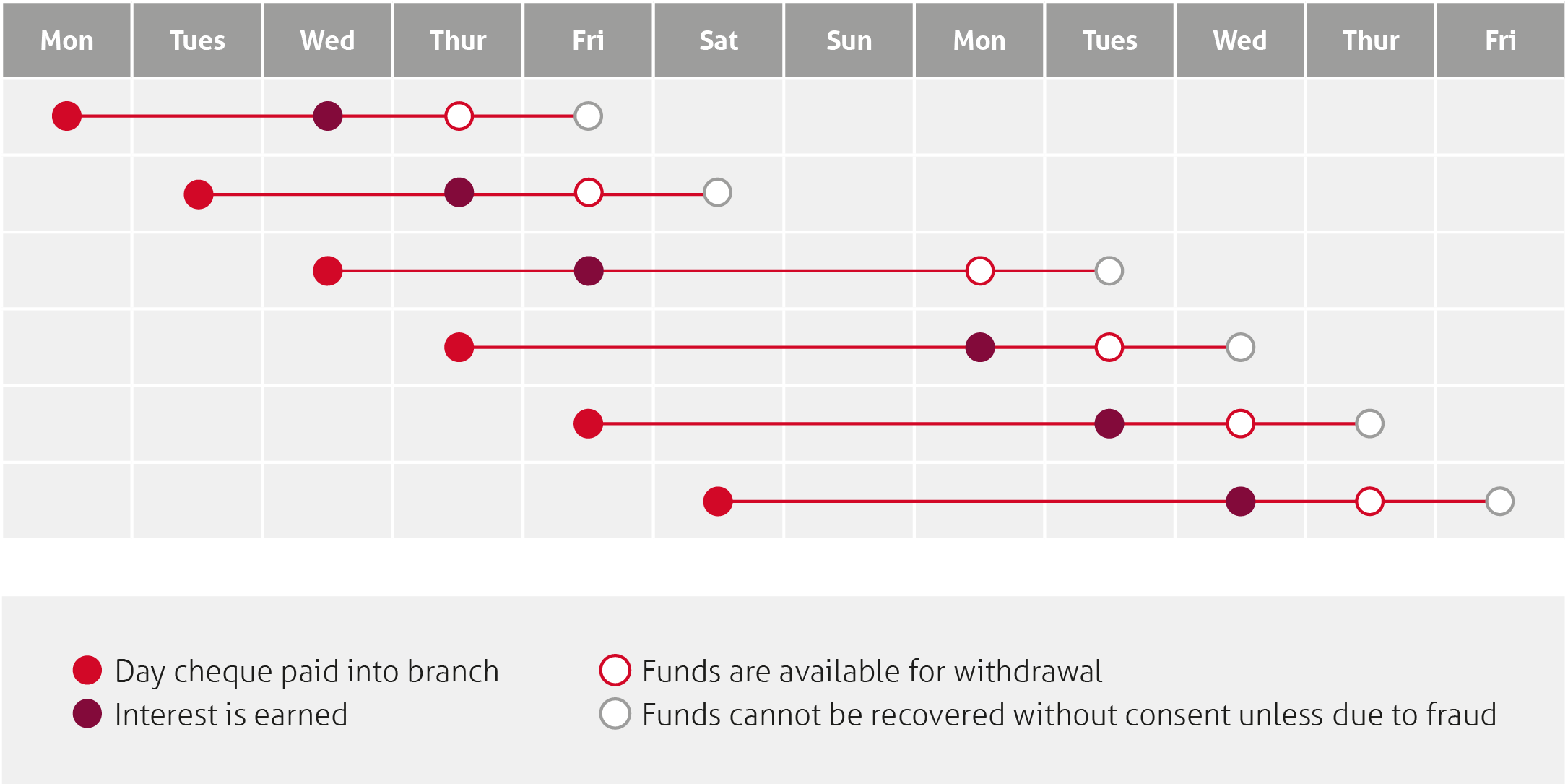
Please note
Timeline for a cheque paid into your account on Monday
| Monday | The cheque is paid into the account | |
|---|---|---|
| Tuesday | Working day 1 | The cycle starts on the first working day after the cheque is paid into your account. A working day is any day excluding a Saturday, Sunday or bank holiday in England and Wales. If a Saturday, the cycle will start on the next working day. |
| Wednesday | Working day 2 | Interest starts to be earned today. |
| Thursday | Working day 3 | You will be able to withdraw the money today. However the cheque could still be returned unpaid (bounced) until the end of working day 4. |
| Friday | Working day 4 | You can be sure the money is yours at the end of today. The money cannot be reclaimed without your consent (unless you are a knowing party to fraud). |
Other forms
Here is a form you might find useful when operating your Chelsea Building Society accounts. Download, complete and sign the form if you need it and then post to our office:
Yorkshire Building Society
Yorkshire House
Yorkshire Drive
Bradford
West Yorkshire
BD5 8LJ